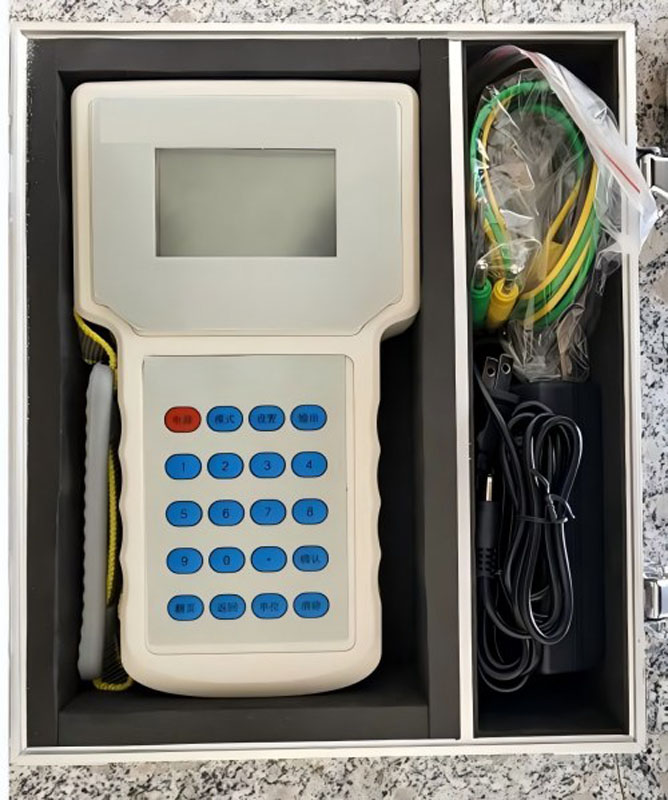
NX-1AHandheld small current generator
The NX-1A handheld current generator is a compact and lightweight device that utilizes linear amplifier principles for output.
1.Overview
The NX-1A handheld current generator is a compact and lightweight device utilizing linear amplifier principles for outputting current signals. It is suitable for current signal simulation, calibration of ammeters, protective devices, and signal acquisition systems.
2.Two main characteristics
● Adjustable current and time settings;
● Measuring output duration based on current flow interruption;
● Compact and lightweight design for easy handheld operation;
● Long-lasting performance with high-capacity lithium batteries;
● Ergonomic design for comfortable grip;
● High output precision and strong load-bearing capacity;
● Dual-range configuration ensures accurate output;
● Automatic output level switching according to preset values;
● Quick-connect wiring for hassle-free installation.
3. Main Technical Parameters Output current: AC 0–200mA with two settings (0–1A) that automatically switch based on preset values.
Output voltage: AC 0–2V.
Load capacity: <2Ω.
Output accuracy:>0.1%.
Output stability: 0.1%.
Time measurement accuracy: 1mS.
4. Operating Instructions
1. Screen Display
(1) Frequency: Current output frequency;
(2) Setting: Current setting automatically switches to corresponding voltage level;
(3) Output Timing: When selected as "Output Timing Mode", the instrument records current output duration from presence to absence, applicable for leakage protection product testing. When selected as "Test S Mode", the instrument outputs preset current values;
(4) T: In "Output Timing Mode", displays output duration with current recording cessation. In "Test S Mode", shows current output time and automatically stops at preset duration without user intervention;
(5) 1.0000A: Current output setpoint;
(6) OFF: Output status indicator. Switches to ON during operation and automatically reverts to OFF upon circuit disconnection;
(7) 000000A: Set operation position.
2. Keyboard:
(1) Power: Power button;
(2) Modes: Switching keys for "Output Timing" and "Test S" modes;
(3) Settings: System configuration and calibration interface (the latter password-protected by manufacturer to prevent unauthorized modifications);
(4) Output: Output and stop buttons;
(5) Confirm: Key to validate settings changes – input invalid if not pressed after value entry;
(6) Page Navigation: Moves cursor position
(7) Back: Reverts to previous operation;
(8) Units: Switches between mA and A;
(9) Clear: Erases previous input values;
(10) 0-9 Numeric Keys: Output settings with decimal points.